A custom food is private: only you, or your team, can log it. Use one for a home recipe, your own staple, or anything that shouldn't be public. For a packaged product, choose Suggest to Foodzone instead, so everyone gets it. See Suggest a missing food.
On the Actions page select Add action, choose Food and the food database, then Create. On the Australia database, choose Keep it private at the top of the new food page. Nothing is saved until you select Create.
Name and describe it
Give the food a Name (this is what you'll search for in the diary), an optional Brand and an optional Description.
Add measures
Measures are the serving options you'll pick from when logging the food. Grams (or millilitres) always work, and you can add household measures:
- Next to Measures, select Add.
- Enter a name and the weight in grams of one measure, for example "cup" and "60" for a 60 g cup.
- Select Add. Use the pencil and bin icons on a measure to edit or remove it.
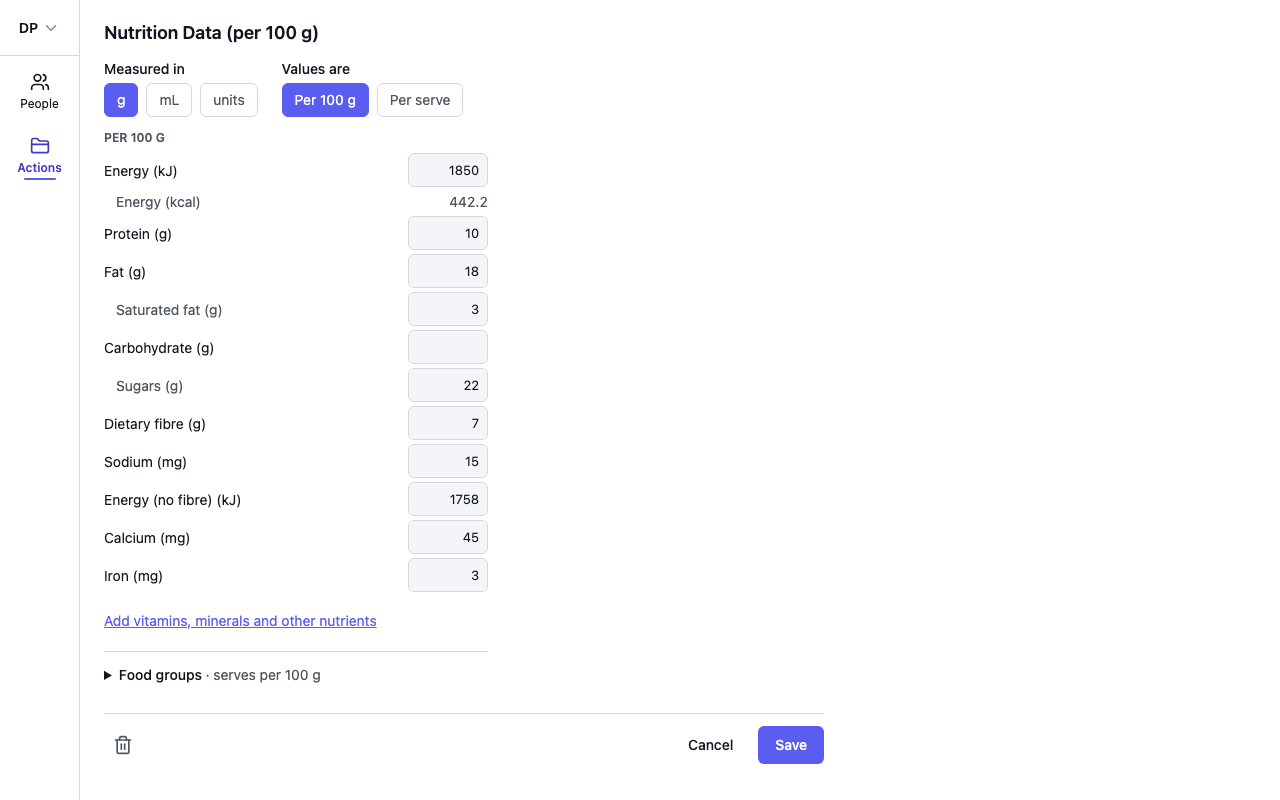
Enter the nutrition data
Measured in says how the food is logged: g if it's weighed, mL if it's poured, units if it's counted (capsules, gummies, scoops). It is set when you create the food.
Values are says which column you're copying from the label. Per 100 g (or Per 100 mL) is on every Australian panel. If you copy the per-serve column, choose Per serve and pick the serve from your measures. Foodzone converts it to per 100 when you save.
The eight lines every panel prints are always on the page. For anything else, such as calcium, iron or a vitamin, select Add vitamins, minerals and other nutrients, tick the lines you need and select Done. Anything left blank is simply not counted.
In databases with Food Groups, open Food groups at the bottom of the page and enter serves for the sub-groups. The parent totals are calculated automatically.
Save
Select Create for a new food, or Save afterwards. If a value doesn't pass validation (for example a negative nutrient), the message appears below the field and nothing is saved until you fix it. Navigating away with unsaved changes asks whether to discard them.